Sources
Overview
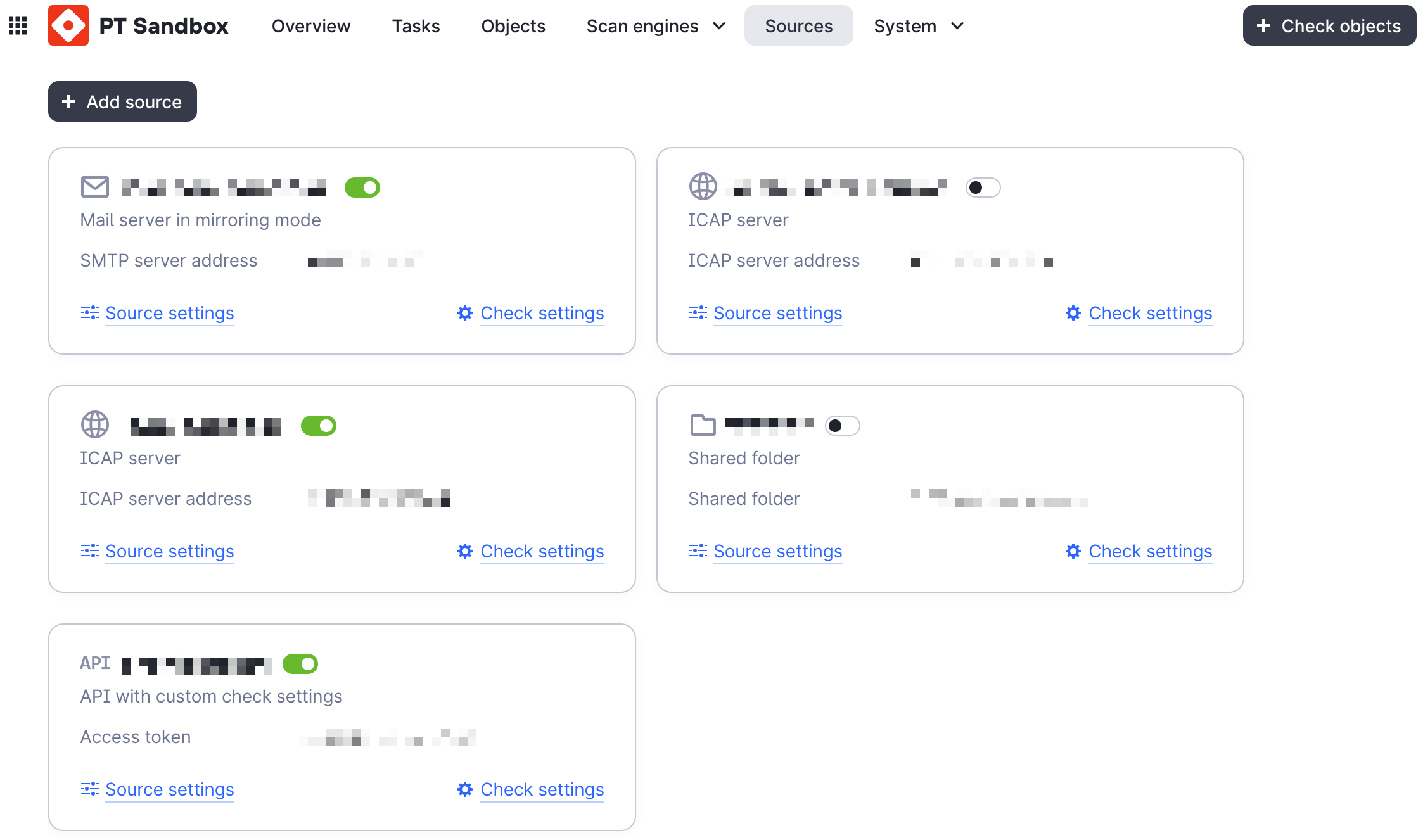
The sandbox lets you create scan sources with pre-configured scan settings.
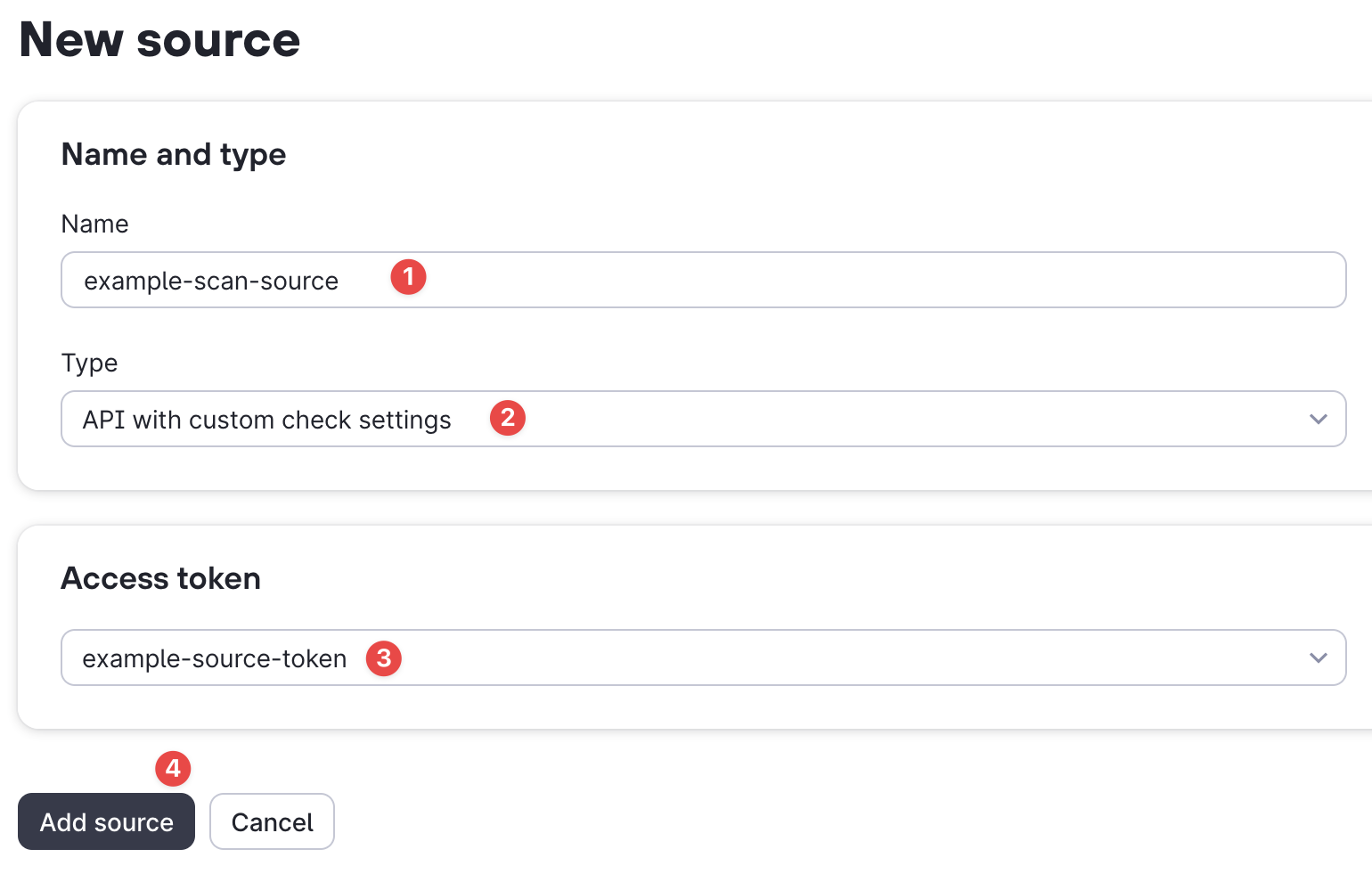
To do this, create a source as shown in the example below and select the appropriate API key for it. In our case, example-source-token.
Note
The API key must have at least the Check with source settings permission.
See the sandbox documentation for additional details.
Scan files
import asyncio
from pathlib import Path

from ptsandbox import Sandbox, SandboxKey


async def main():
    key = SandboxKey(
        name="test-key-1",
        key="<TOKEN_FOR_SOURCE>",
        host="10.10.10.10",
    )

    async with Sandbox(key) as sandbox:
        report = await sandbox.source_check_file("./malware.exe") # (1)!
        print(report)

asyncio.run(main())
- By default, a short report is returned. For a full report, add the option
short_result=False
import asyncio
from pathlib import Path

from ptsandbox import Sandbox, SandboxKey


async def main():
    key = SandboxKey(
        name="test-key-1",
        key="<TOKEN_FOR_SOURCE>",
        host="10.10.10.10",
    )

    async with Sandbox(key) as sandbox:
        task = await sandbox.source_check_file(
            "./malware.elf",
            async_result=True,
        )

        report = await sandbox.wait_for_report(
            task,
            wait_time=100,
            scan_with_source=True, # (1)!
        )


asyncio.run(main())
- When using asynchronous requests with a source, you must pass the option
scan_with_source=True, otherwise you will get a 401 error.
ptsandbox.sandbox.sandbox.Sandbox.source_check_file
async
source_check_file(
    file: str | Path | bytes | BinaryIO,
    /,
    *,
    file_name: str | None = None,
    short_result: bool = True,
    async_result: bool = False,
    priority: int = 3,
    passwords_for_unpack: list[str] | None = None,
    product: str | None = None,
    metadata: dict[str, str] | None = None,
    read_timeout: int = 240,
) -> SandboxBaseTaskResponse
Your application can run a file check with predefined parameters and in response receive the results of the check and/or the ID of the task.
Parameters:
-
file(str | Path | bytes | BinaryIO) –The file to be sent for analysis
-
file_name(str | None, default:None) –The name of the file to be checked, which will be displayed in the sandbox web interface.
If possible, the name of the uploaded file will be taken as the default value.
If not specified, the hash value of the file is calculated using the SHA-256 algorithm.
-
short_result(bool, default:True) –Return only the overall result of the check.
Attention. When using a query with the full result (short_result=false), the response waiting time can be increased by 2 seconds.
For example, scanning a file without BA takes an average of hundreds of milliseconds, and you will have to wait seconds to get the full result, which is much longer.
-
async_result(bool, default:False) –Return only the scan_id without waiting for the scan to finish.
The "result" key is missing in the response.
-
priority(int, default:3) –The priority of the task is from 1 to 4. The higher it is, the faster it will get to work.
-
passwords_for_unpack(list[str] | None, default:None) –A list of passwords for unpacking encrypted archives
-
product(str | None, default:None) –The source ID string is "EDR" or "CS" ("PT_EDR" or "PT_CS").
You only need to fill it out during integration
-
metadata(dict[str, str] | None, default:None) – -
read_timeout(int, default:240) –Response waiting time in seconds
Raises:
-
ValueError–if passed values are incorrect
-
SandboxException–if incorrect file type is passed (usually when ignoring type hints)
-
ClientResponseError–if the server returns an error status
-
ClientError–on connection or transport errors
-
ValidationError–if the response body does not match the expected model
ptsandbox.sandbox.api._scan.ScanMixin.source_check_file
async
source_check_file(
    file: str | Path | bytes | BinaryIO,
    data: SandboxScanWithSourceFileRequest,
    read_timeout: int = 240,
) -> SandboxBaseTaskResponse
Send a file to the sandbox with source settings
Parameters:
-
file(str | Path | bytes | BinaryIO) –The file to be sent for analysis
-
data(SandboxScanWithSourceFileRequest) –Request parameters in model
-
read_timeout(int, default:240) –Response waiting time in seconds
Raises:
-
SandboxException–if incorrect arguments are passed (usually when ignoring type hints)
-
ClientResponseError–if the server returns an error status
-
ClientError–on connection or transport errors
-
ValidationError–if the response body does not match the expected model
Scan URLs
import asyncio
from pathlib import Path

from ptsandbox import Sandbox, SandboxKey


async def main():
    key = SandboxKey(
        name="test-key-1",
        key="<TOKEN_FOR_SOURCE>",
        host="10.10.10.10",
    )

    async with Sandbox(key) as sandbox:
        report = await sandbox.source_check_url("http://malware.com/file.elf") # (1)!
        print(report)

asyncio.run(main())
- By default, a short report is returned. For a full report, add the option
short_result=False
import asyncio
from pathlib import Path

from ptsandbox import Sandbox, SandboxKey


async def main():
    key = SandboxKey(
        name="test-key-1",
        key="<TOKEN_FOR_SOURCE>",
        host="10.10.10.10",
    )

    async with Sandbox(key) as sandbox:
        task = await sandbox.source_check_url(
            "http://malware.com/file.elf",
            async_result=True,
        )

        report = await sandbox.wait_for_report(
            task,
            wait_time=100,
            scan_with_source=True, # (1)!
        )


asyncio.run(main())
- When using asynchronous requests with a source, you must pass the option
scan_with_source=True, otherwise you will get a 401 error.
ptsandbox.sandbox.sandbox.Sandbox.source_check_url
async
source_check_url(
    url: str,
    /,
    *,
    short_result: bool = True,
    async_result: bool = False,
    priority: int = 3,
    passwords_for_unpack: list[str] | None = None,
    product: str | None = None,
    metadata: dict[str, str] | None = None,
    read_timeout: int = 240,
) -> SandboxBaseTaskResponse
Your application can run a URL scan and receive the scan results and/or the ID of the task.
Parameters:
-
url(str) –The URL to be sent for analysis
-
short_result(bool, default:True) –Return only the overall result of the check.
Attention. When using a query with the full result (short_result=false), the response waiting time can be increased by 2 seconds.
For example, scanning a file without BA takes an average of hundreds of milliseconds, and you will have to wait seconds to get the full result, which is much longer.
-
async_result(bool, default:False) –Return only the scan_id without waiting for the scan to finish.
The "result" key is missing in the response.
-
priority(int, default:3) –The priority of the task is from 1 to 4. The higher it is, the faster it will get to work.
-
passwords_for_unpack(list[str] | None, default:None) –A list of passwords for unpacking encrypted archives
-
product(str | None, default:None) –The source ID string is "EDR" or "CS" ("PT_EDR" or "PT_CS").
You only need to fill it out during integration
-
metadata(dict[str, str] | None, default:None) – -
read_timeout(int, default:240) –Response waiting time in seconds
Raises:
-
ValueError–if passed values are incorrect
-
ClientResponseError–if the server returns an error status
-
ClientError–on connection or transport errors
-
ValidationError–if the response body does not match the expected model
ptsandbox.sandbox.api._scan.ScanMixin.source_check_url
async
source_check_url(
    data: SandboxScanWithSourceURLRequest,
    read_timeout: int = 240,
) -> SandboxBaseTaskResponse
Send the URL to the sandbox with source settings
Parameters:
-
data(SandboxScanWithSourceURLRequest) –Request parameters in model
-
read_timeout(int, default:240) –Response waiting time in seconds
Raises:
-
ClientResponseError–if the server returns an error status
-
ClientError–on connection or transport errors
-
ValidationError–if the response body does not match the expected model
Check task status
When using async_result=True, you can check the status of a scan task using check_task (for regular scans) or source_get_status (for source scans). To get the full report, use get_report or source_get_report respectively.
from uuid import UUID

from ptsandbox import Sandbox, SandboxKey

async with Sandbox(SandboxKey(...)) as sandbox:
    # Check status of a regular scan
    status = await sandbox.check_task(UUID("..."))
    print(status.data.status)

    # Check status of a source scan
    source_status = await sandbox.source_get_status(UUID("..."))
    print(source_status.data.status)
ptsandbox.sandbox.sandbox.Sandbox.check_task
async
Checking the result of a scan running with the async_result flag
Parameters:
-
task_id(str | UUID) –ID of the task to check
-
allow_preflight(bool, default:True) –If this flag is set, an intermediate result with the
is_preflightattribute will be returned for scanning with multiple stages (for example, static + BA).
Returns:
-
SandboxCheckTaskResponse–Information about the analysis status
Raises:
-
SandboxException–if the passed task_id is not in UUID format
-
ClientResponseError–if the server returns an error status
-
ClientError–on connection or transport errors
-
ValidationError–if the response body does not match the expected model
ptsandbox.sandbox.sandbox.Sandbox.source_get_status
async
Check the status of a scan started via the source API (source_check_file / source_check_url).
Returns only the status without the full report. For the full report, use source_get_report.
Parameters:
-
task_id(str | UUID) –ID of the task to check
-
allow_preflight(bool, default:True) –If this flag is set, an intermediate result with the
is_preflightattribute will be returned for scanning with multiple stages (for example, static + BA).
Returns:
-
SandboxCheckTaskResponse–Information about the analysis status
Raises:
-
SandboxException–if the passed task_id is not in UUID format
-
ClientResponseError–if the server returns an error status
-
ClientError–on connection or transport errors
-
ValidationError–if the response body does not match the expected model
ptsandbox.sandbox.api._scan.ScanMixin.source_get_status
async
Check the status of a scan started via the source API (source_check_file / source_check_url).
Returns only the status without the full report. For the full report, use source_get_report.
Parameters:
-
data(SandboxCheckTaskRequest) –request parameters (scan_id and allow_preflight)
Returns:
-
SandboxCheckTaskResponse–Information about the analysis status
Raises:
-
ClientResponseError–if the server returns an error status
-
ClientError–on connection or transport errors
-
ValidationError–if the response body does not match the expected model
ptsandbox.sandbox.api._scan.ScanMixin.source_get_report
async
Get the full scan report created using the source settings
Parameters:
-
scan_id(UUID) –task id
Returns:
-
SandboxBaseTaskResponse–The response from the sandbox is either with partial information (when using async_result), or with full information.
Raises:
-
ClientResponseError–if the server returns an error status
-
ClientError–on connection or transport errors
-
ValidationError–if the response body does not match the expected model